Pattern Builder reference
The Pattern Builder is a nested-box editor. You add boxes for segments, rows, repeats, rule blocks, and notes, fill in their fields, and the result is a pattern the tracker can follow row by row. This page is a reference for every concept the Builder exposes.
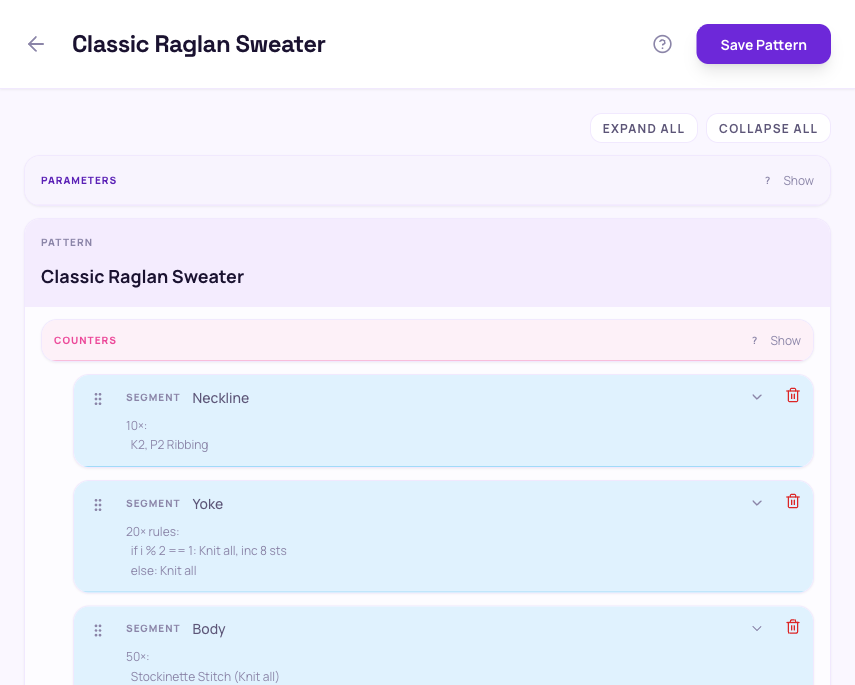
Pattern shape
A pattern is a tree. The outermost layer is your pattern with a title. Inside, you add one or more segments: the major sections of the knit, like "Cuff", "Leg", "Heel". Each segment holds an ordered list of steps: rows, repeat blocks, rule blocks, and notes.
Above the segments live the pattern's parameters — the knobs the knitter sets when starting a project. Inside each segment you can declare local counters that track values changing during the knit.
The whole tree is editable in place. Click a node to expand or collapse it, drag to reorder siblings, and use the + buttons between siblings to insert new steps.
Segments
A segment groups the steps of one major section of the knit. A pattern must have at least one segment. Segments are typically named after the part of the garment they produce — Cuff, Leg, Heel turn, Gusset, Foot, Toe.
You can declare segment-scoped counters at the top of a segment. They are visible only inside that segment.
Testing your pattern
While editing, tap the Test button on a segment to launch a throw-away tracker session against your current draft. You pick the parameter values and the Builder hands the pattern straight to the tracker — nothing is saved to the library.
Use it to sanity-check that expressions evaluate the way you expect, that repeats end where you want them to, and that rule blocks pick the right instruction. Close the test and you're back in the editor with no side effects.
Rows
A row is one instruction the tracker advances through. Type the instruction text directly: "Knit to end", "K1, P1 to last 2, P2tog", etc.
Use {expression} inside the text to embed a live computed value — see Interpolation below.
A row can also carry one or more deltas that update counters when the knitter completes the row.
Repeat blocks
A repeat block runs its child steps multiple times. Three count modes:
- Fixed — an integer count. Switch to a computed expression like
cast_on / 4when the count depends on a parameter or counter. - Until text — a free-form goal the knitter judges by eye ("until 4 inches"). The tracker advances when the knitter says they're done.
- Until predicate — a boolean expression over counters, like
extra == 0. The block ends as soon as the predicate is true.
Repeat blocks can nest. Each repeat exposes a structural counter (named r by default) that starts at 1 and increments per iteration.
Rule blocks
A rule block is a repeat block that picks a different instruction based on which iteration is running. Use it when right-side and wrong-side rows differ, when shaping happens every Nth row, or any time the row number should pick the instruction.
Each rule has the form If r mod N == K: instruction. The first matching rule wins; if none match, the Else clause runs (if defined). r is the iteration counter, starting at 1.
Examples:
r mod 2 == 1— odd rowsr mod 2 == 0— even rowsr mod 4 == 1— every 4th row, starting on row 1
Per-rule deltas let you change counters only when that rule fires. For instance, decrement a stitch count by 2 only on the decrease rows.
Notes
A note is free-form text shown to the knitter without counting as a worked row. Use notes for setup instructions ("Cast on 64 sts. Join in round."), reminders, or stitch-count check-ins.
Notes also support {expression} interpolation, so you can write "Pick up {cast_on / 4} sts along each side".
Parameters
Parameters are the knobs the knitter sets when starting a project — cast-on count, leg length, sleeve length. Each parameter has:
- name — how it's referenced in expressions, e.g.
cast_on - type —
int,text, orbool - default — the starting value if the knitter doesn't override it
- label (optional) — a friendly display name shown when starting a project
Parameter names start with a letter and contain only letters, digits, and underscores. Reference them by name inside any expression: cast_on / 4, leg_rows + 10.
Counters
Counters track values that change while knitting — live stitches on a needle, picked-up gusset stitches, decreases worked. Counters are scoped to the segment they're declared in.
A counter has a name and an initial value, which is often a parameter expression like cast_on / 2. To change a counter from a row, attach a delta to that row.
Reference counters in instructions, repeat counts, predicates, and other counter initial values — same as parameters.
Counters are Manual by default — you set a starting value and change it with deltas and links. Switch a counter to Automatic to give it an expression like cast_on - decreases that's re-evaluated every row instead. A Manual counter can also carry links: a link bumps the counter by a delta each time a repeat's iteration counter advances, optionally gated by a condition.
Deltas
A delta changes a counter when the knitter completes a row. Deltas live on rows. Rule-block rules can carry per-rule deltas so the change only happens on rows that match the rule.
The form is delta <counter> += <expression>. The expression is added to the counter's current value — use a negative expression to decrease:
delta live += 1— grow by 1delta extra += -2— decrement by 2delta sts += rs_inc— add a computed amount
Expressions
Expressions combine parameters, counters, literals, and operators. They appear anywhere a count, an initial value, a predicate, a delta, or a row instruction needs a value.
Supported operators:
- Arithmetic:
+-*/% - Comparison:
==!=<<=>>= - Boolean:
andornot - Predicate sugar:
r is odd,r is even - Parentheses for grouping:
(cast_on / 2) + 1
Integer division truncates toward zero. Text values can be joined with +, e.g. "K " + live + ", ssk".
Text interpolation
Inside row text and notes, anything between { and } is treated as an expression. Its value is computed live while the knitter works through the pattern.
Examples:
Cast on {cast_on} sts→ "Cast on 64 sts"Pick up {cast_on / 4} sts each sideSl 1, K {live}, ssk, K1, turn
To include a literal { character, write {"{"} — an expression that evaluates to the string {.
Outgrowing the Builder?
If you're typing the same row pattern over and over, or your stitch counts depend on math the Builder can't express, try the Text DSL or the JavaScript SDK.